Your Desk Is Not the Perimeter: A Room-by-Room Security Walkthrough for Shared UK Offices
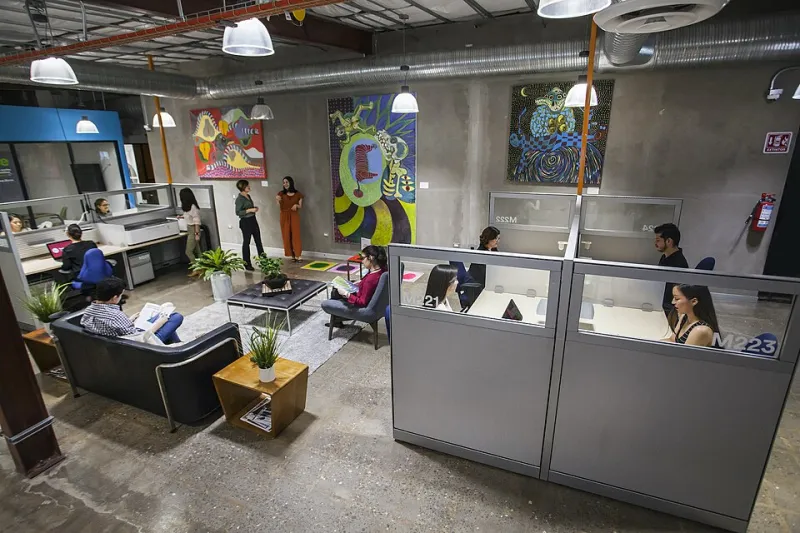
Photo: Missionedit, CC BY-SA 4.0, via Wikimedia Commons
You lock your laptop when you leave the desk. You would not leave client files open on a train. And yet, in a shared office building, the front door is probably propped open for a delivery, the Wi-Fi is shared with forty other companies, and the cleaner has a key to the floor. None of that is a disaster. It is simply part of the threat model you signed up for when you took the flexible lease.
Physical security has a reputation as an enterprise luxury: turnstiles, mantraps, security guards with earpieces. For a small UK team in a coworking space or serviced office, that is not the reality. The reality is a shared kitchen, a post tray by reception, a meeting room with a whiteboard that never gets wiped, and a building manager who is lovely but not your security team. The underdog advantage is that you can walk the space in twenty minutes and fix most of it yourself.
The threat model you did not sign up for
Shared offices blur the line between your organisation and everyone else's. The building may have good physical controls at the front desk, but those controls are designed for the building, not for your data. Visitors sign in for one company and wander to another. Hot desks mean the person next to you is not your colleague. Cleaning contractors work out of hours. Post arrives in a shared tray. The Wi-Fi is one network for everyone, including the guest who is 'just here for a coffee'.
None of this means you need to move to a bunker. It means you should treat the shared parts of the building as hostile territory, and the parts you control as worth defending properly.
Reception and visitor access
Start at the front door. Does reception actually challenge people, or do they buzz them through? Is there a visitor log, and does anyone check it? Can a visitor say 'I'm here for the fourth floor' and get a badge without the host being called? These are building-level questions, but they affect you.
Low-cost fixes: agree a visitor policy with your team and put it in the answer bank for client questionnaires. Meet visitors in the lobby or a booked meeting room rather than walking them through your desk area. Never leave a laptop, phone or notebook unattended in a meeting room. If the building offers named access cards, use them rather than a shared floor code. And do not assume reception will challenge a tailgater; polite confidence gets people through most doors.
The hot desk and the clear desk
Hot desking is a security control problem disguised as a seating plan. If anyone can sit anywhere, then anyone can sit next to a screen left unlocked. The fix is not complicated: lock your screen every time you stand up, use a privacy filter if you handle sensitive data, and keep devices physically secured when you step away. A cable lock is cheap and deeply unfashionable, which is exactly why it works.
At the end of the day, clear the desk. Not just for tidiness: notebooks, sticky notes, printed invoices and bank details are all open-source intelligence for anyone who walks past. If the building provides lockable pedestals, use them. If not, buy a small lockable cabinet for the team and put your paper and spare devices in it. Keep an asset register that says what is on site and who owns it. If a laptop goes missing, you want to know within the hour, not at the next audit.
Meeting rooms
The meeting room is where confidential information goes to be forgotten. Whiteboards keep the last client's architecture diagram. Conference phones stay logged into someone's account. A laptop is left connected to the room's HDMI cable with the screen unlocked. Guests use the same Wi-Fi as your finance system.
Low-cost fixes: wipe the whiteboard at the end of every meeting. Log out of conference accounts and avoid 'remember me' on shared room devices. Check the room before you leave: cables, adapters, printed handouts, badges. If you use the room for client calls, book it rather than hoping it is free. And if the room has a guest Wi-Fi network, use it for visitors rather than handing out your main network password.
Shared Wi-Fi is not your friend
Assume the shared office network is hostile. That is not an insult to the building; it is simply the correct posture when you do not control the router. Use a company VPN or zero-trust access tool for work, especially when accessing finance, HR or client data. If you control your own router or access point, put guest devices on a separate network and keep printers and storage off the main one. If you do not control it, encrypt everything you can and avoid connecting devices that do not need to be online.
Printers deserve a special mention. A shared multifunction printer may store copies of everything it prints. Use PIN release if available, collect prints immediately, and avoid printing sensitive documents unless you have to. If you do print, do not leave the output sitting in the tray.
Post, parcels and the paper problem
Shared post rooms are a quiet leak. A parcel with a laptop inside sits on a shelf with a hundred other parcels. A bank statement arrives in a tray and gets opened by someone looking for their own post. A client sends a signed contract to the building's address and it is never marked for your team.
Low-cost fixes: use a named recipient and, if the building allows it, a separate mail bag or tray. Consider a virtual office or PO box for sensitive post. Ask suppliers to send invoices electronically. Shred anything with personal or client data rather than putting it in the shared recycling bin. If you handle paper, buy a cheap cross-cut shredder and keep it near the desk, not in the stationery cupboard.
Cleaners, contractors and the out-of-hours gap
Cleaners and contractors are not the enemy. They are trusted people doing a job, often after hours, with access to rooms you have already left. The risk is not that they are malicious; it is that they are not your staff and should not have to work around your sensitive documents.
Before you leave, put paper away, lock devices and close screens. Do not leave access cards on desks. If the building uses alarm codes, make sure the code is changed when someone leaves your team, not just when someone leaves the building. If a contractor needs access to your area, agree what they can see and when. A little tidying is a better control than a lecture.
The one-page checklist
Print this and walk the space once a quarter.
- Reception challenges visitors, or your team meets them at the door.
- No tailgating through secure doors; badges are worn, not shared.
- Screens lock automatically and privacy filters are used where needed.
- Devices are cable-locked or locked away when unattended.
- Paper with client or personal data is locked away or shredded.
- Lockable storage exists for devices, documents and spare kit.
- Meeting rooms are reset after use; whiteboards wiped, accounts logged out.
- Shared Wi-Fi is treated as hostile; VPN or zero-trust access is used.
- Guest devices are on a separate network where possible.
- Printers use PIN release and prints are collected immediately.
- Post has a named recipient and is not left in a shared tray.
- Cleaners and contractors have no access to unlocked sensitive material.
- Asset register is up to date and someone owns it.
- Leavers return badges, keys and devices on their last day.
- The checklist has a date and a name against it.
Physical security is not glamorous. It rarely makes the incident report because the incident usually does not happen. But in a shared building, the small gaps are exactly where a determined visitor or an opportunistic thief will start. Twenty minutes with a checklist is cheaper than a lost laptop and a difficult conversation with a client. That is the underdog advantage: you can see the whole space, and you can fix most of it before lunch.